
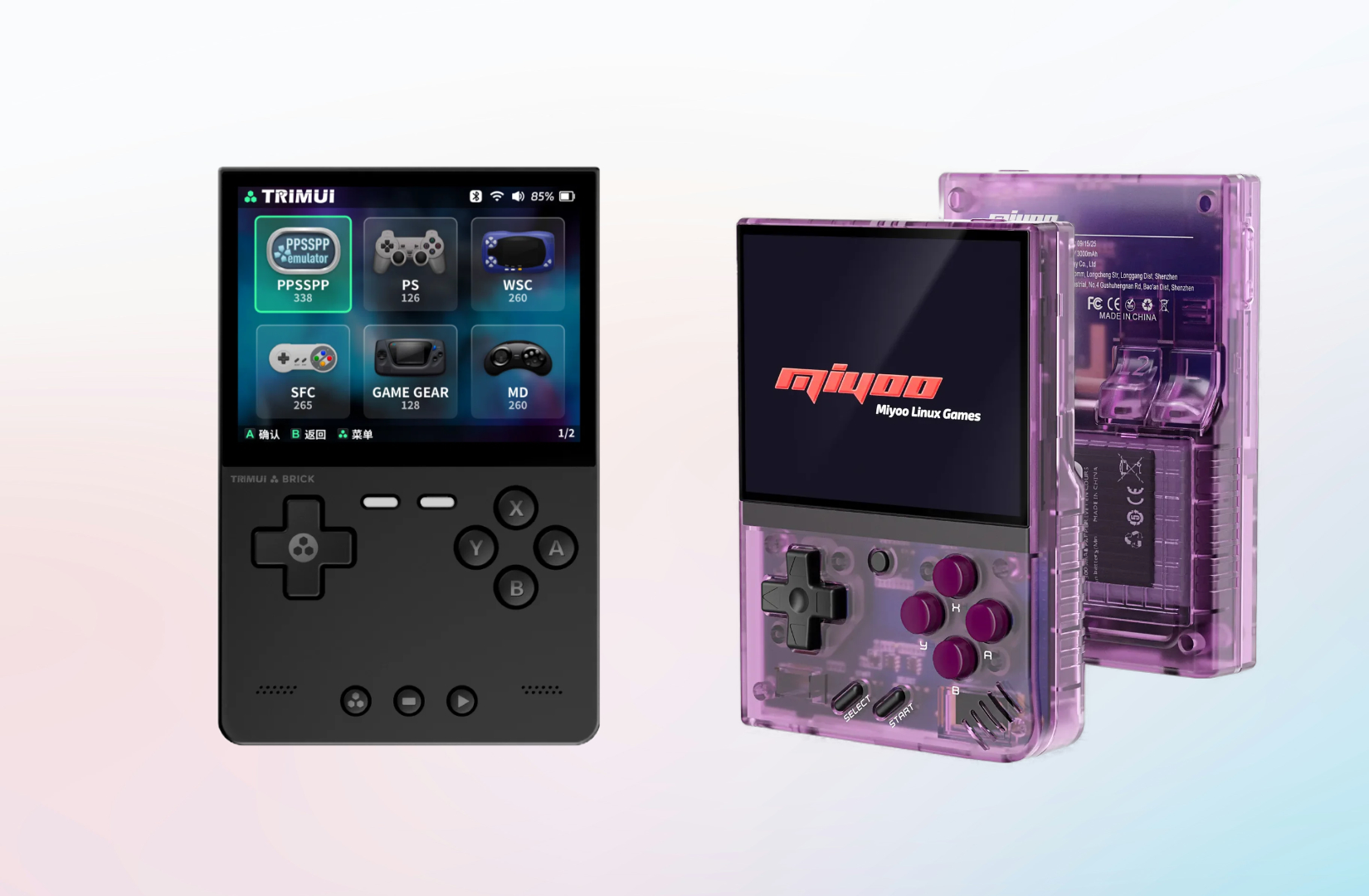
When choosing a budget vertical handheld under $100, the Miyoo Mini+ vs. TrimUI Brick is the definitive matchup. While both deliver rock-solid performance across 8-bit, 16-bit, and PlayStation 1 libraries, they take very different approaches to the retro gaming experience.
Until recently, the Miyoo Mini+ was the uncontested starter handheld and pocket EDC of choice. With the arrival of the TrimUI Brick, that crown is no longer guaranteed. Between display differences, ergonomic profiles, and operating system ecosystems, each device shines in distinct ways. Here is how they stack up head-to-head.
Miyoo Mini+
$51.29 $79.99 Coupon: View Deal →
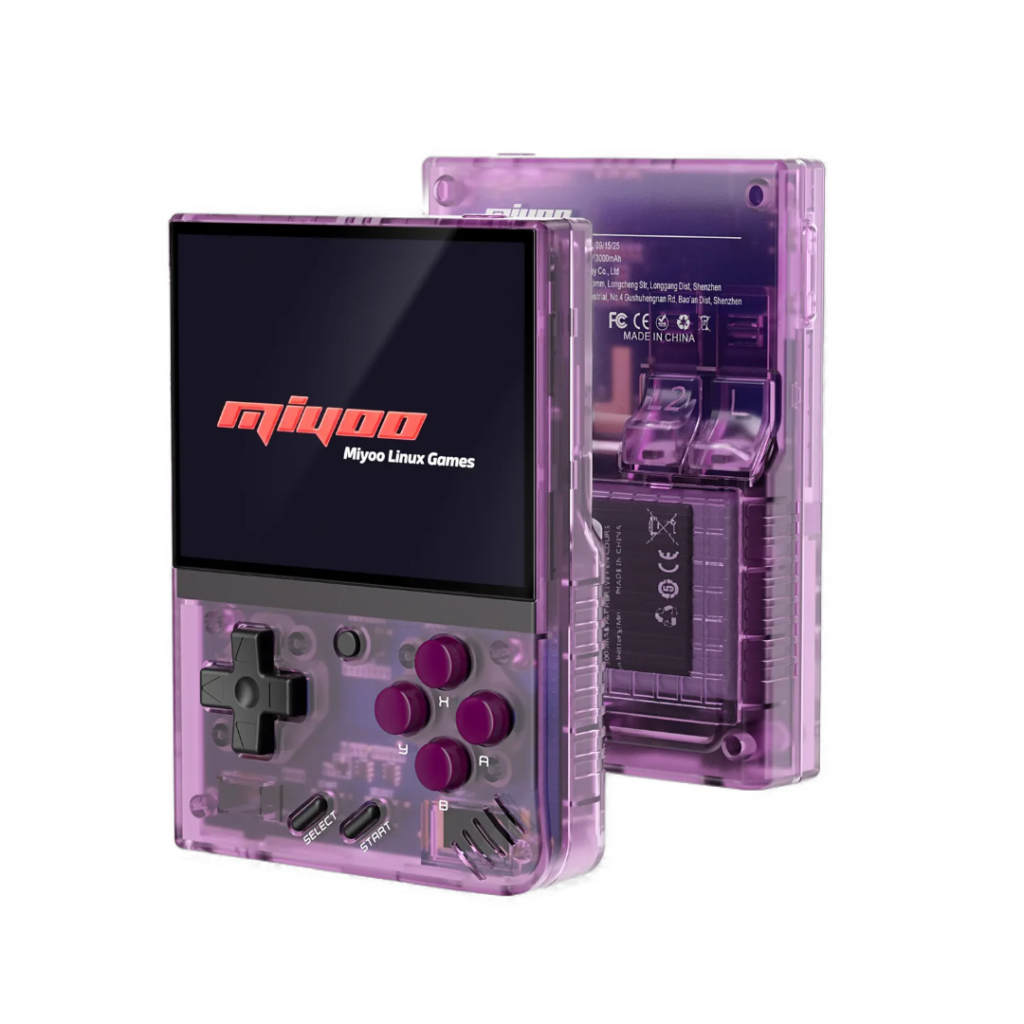
The Miyoo Mini+ earned its status as a community favorite by getting the essentials right: an approachable form factor, retro charm, and an ecosystem that turns raw budget hardware into a friction-free gaming appliance. Built around a crisp 3.5-inch IPS display (640×480) with slim bezels, it strikes the ideal middle ground between pocketable convenience and comfortable, strain-free play sessions.
Nostalgia Meets Modern Polish
Featuring a classic Game Boy-inspired vertical layout, the Miyoo Mini+ brings soft-touch, responsive face buttons and a quiet, mushy D-pad reminiscent of original 90s hardware. Its compact dimensions make it an effortless everyday carry, while rear flared shoulder buttons and built-in Wi-Fi provide essential modern quality-of-life perks: from wireless game transfers to RetroAchievements syncing.
The Secret Weapon: OnionOS
While the stock Linux firmware is capable, the true power of the Miyoo Mini+ lies in its third-party support, most notably OnionOS. Community-driven firmware transforms the device with:
- Game Switcher: Instant state-saving and visual card swapping between games with a single tap.
- Seamless Sleep/Wake: Tap the power button to save state and cut power completely; tap again to resume mid-jump in under five seconds.
- Refined Emulation: Pre-configured RetroArch settings, optimized screen scaling filters, and scrapeable box art out of the box.
Best For: Players who want the absolute simplest, most seamless software experience (via OnionOS) and value instant pick-up-and-play mechanics over raw processing power.
Miyoo Mini+ Specs
- Display: 3.5” IPS (640×480, 4:3)
- Processor: ARM Cortex-A7 dual-core @ 1.2GHz
- Battery: 3000 mAh (approx. 4–6 hrs)
- Target Systems: NES, SNES, Genesis, GBA, PS1, Arcade
TrimUI Brick
$77.39 $89.99 Coupon: View Deal →
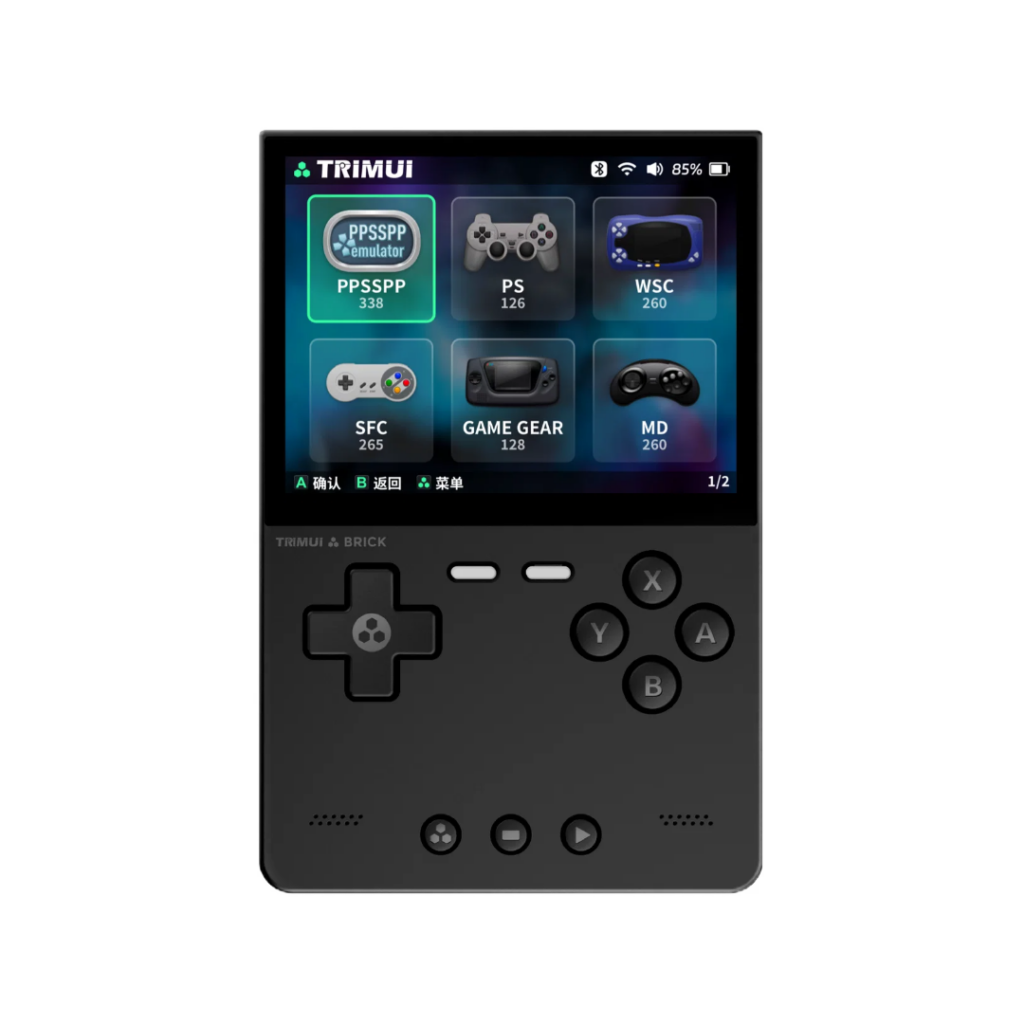
The TrimUI Brick takes a distinctly industrial, hardware-first approach to the vertical budget handheld formula. Living up to its name, it embraces clean monolithic lines, flat edges, and an exceptionally rigid build that feels far more premium than its price tag suggests. By focusing on structural density and display fidelity, it serves as a sleek, modern reimagining of pocket-sized retro gaming.
Premium Fit and Finish
Unlike standard lightweight budget shells, the Brick emphasizes solid construction with dense ABS plastic reinforced by a rear alloy metal plate that adds structural rigidity and a cool-to-the-touch heft. The controls reflect TrimUI’s signature tactile philosophy: short-travel, clicky microswitch face buttons paired with a precise, low-profile D-pad. Subtle RGB lighting beneath the face buttons and along the rear light bar offers a splash of modern customization that can be dialed in or completely disabled for an understated, stealth look.
A Razor-Sharp Display
The standout feature of the Brick is its 3.2-inch IPS display. Boasting an unusual 1024×768 resolution at a classic 4:3 aspect ratio, it delivers an ultra-dense ~405 PPI. The fully laminated 3.2-inch panel delivers punchy contrast, clean integer scaling, and razor-sharp sprites with zero visible pixel grid - all while keeping the chassis compact enough to vanish into a pocket.
Backed by an Allwinner A133P chipset, 1GB of RAM, and growing support for custom community firmware like MinUI and CrossMix-OS, the TrimUI Brick brings high-end industrial design and pixel precision to the budget handheld tier.
Best For: Players who want a premium feeling and powerful device, without paying premium dollars, and are okay with a bit more tinkering if it means you can access slightly heavier systems.
TrimUI Brick Specs
- Display: 3.2” IPS (1024×768, 4:3)
- Processor: Allwinner A133P 4 cores @ 1.8GHz
- Battery: 3000 mAh (approx. 4–6 hrs)
- Target Systems: NES, SNES, Genesis, GBA, PS1, Dreamcast, N64, Arcade
Software Experience: OnionOS vs. The TrimUI Ecosystem
A retro handheld is only as good as the software that launches its games. While both devices run lightweight Linux under the hood, their day-to-day user experiences could not be more different.
Miyoo Mini+: The OnionOS Monoculture
On the Miyoo Mini Plus, there is essentially no debate: OnionOS is mandatory. The factory firmware is sluggish and functional at best, but flashing OnionOS turns the device into the slickest appliance-like experience in budget retro gaming.
- Game Switcher: Pressing the center menu button grabs a live save-state and brings up a visual carousel of your recent games. You can hop between Chrono Trigger on SNES and Castlevania: Symphony of the Night on PS1 in under three seconds without touching a main menu.
- Frictionless Sleep/Wake: A quick tap of the power button auto-saves your state and shuts the device completely down; another tap cold-boots straight back into the exact frame you left. This provides months of standby time without phantom battery drain.
- Curated RetroArch Backend: Aspect ratios, audio buffers, integer scaling, and bezels are pre-configured out of the box.
OnionOS eliminates decision fatigue. You install it once, copy your ROMs, and the software gets out of your way.
TrimUI Brick: A Modular, Fragmented Landscape
The TrimUI Brick takes a more decentralized path. Out of the box, TrimUI Stock OS is surprisingly usable. It features clean artwork scraping, snappy menu navigation, and simple hotkeys. However, the community has branched into several customized alternatives depending on how you play:
- StockMix / CrossMix: Enhanced builds built directly on top of TrimUI’s stock base. They preserve the stock UI’s native hardware integration (like the rear RGB bar) while bundling updated RetroArch cores, standalone emulators, and bug fixes.
- NextUI & MinUI: The top picks for digital minimalists. Both strip away scraping, box art, and complex RetroArch menus in favor of instantaneous, text-driven lists, unified hotkeys, and reliable deep-sleep suspend states. NextUI acts as an evolved branch tailored for modern performance and sleep optimizations.
- Knulli: For players who prefer an EmulationStation/Batocera-style presentation. It brings full visual scraping, rich theme support, and PortMaster access, though at the cost of heavier resource usage and longer cold boot times.
Performance
For their core mission, PS1 and below, both devices deliver full-speed, stutter-free performance. The difference is how they get there, and what happens when you push beyond the 32-bit era.
- Miyoo Mini Plus (Cortex-A7, 128MB RAM): Punches above its weight purely through OnionOS software wizardry. Every core is hyper-optimized, but you hit a hard wall past PS1. There is no GPU for CRT shaders, and heavier systems are out of reach.
- TrimUI Brick (Allwinner A133P, 1GB RAM): Packs more muscle and an actual GPU. You get the overhead to run authentic retro shaders, plus enough power to dip your toes into select N64, Dreamcast, and lightweight Saturn titles.
The Real Differentiator: PortMaster
While OnionOS has an impressive collection of bespoke ports (Diablo, Super Mario 64, Cave Story), the Miyoo's 128MB RAM cap severely limits what can be brought over.
The TrimUI Brick’s 1GB of RAM unlocks full PortMaster support, making it the clear winner for expanded libraries. Instead of being limited to mostly 90s PC conversions, the Brick can natively run modern indie hits like Celeste, Balatro, Stardew Valley, and Shovel Knight.
If you strictly want classic 8-bit to 32-bit emulation, the Miyoo’s optimized limits are plenty. But if you want hardware shaders, extra 3D systems, and modern indie ports, the Brick easily takes the round.
Hardware Feel, Controls & Display
Because both devices are pocket-sized verticals, ergonomics and display choices make or break daily use.
- D-Pad & Face Buttons: The Miyoo Mini+ features soft, quiet rubber membrane pads authentic to classic Game Boy and SNES hardware. The TrimUI Brick uses shallow, tactile dome microswitches that deliver a snappy, audible click similar to a PS Vita.
- Screen Trade-Off: The Miyoo's 3.5-inch panel (640×480) offers a larger canvas that is gentler on the eyes during text-heavy RPGs. The Brick’s smaller 3.2-inch display runs at an ultra-sharp 1024×768 (~405 PPI), completely eliminating visible pixel grids for razor-sharp sprites and integer scaling.
- Chassis & Shoulders: The Miyoo is lightweight, nostalgic plastic with pronounced, flared rear triggers that are easy to locate. The Brick feels like a dense, premium slab reinforced by an aluminum backplate, using low-profile, swappable shoulder buttons that sit flush and slip into a pocket without snagging.
The Verdict: Which One Should You Buy?
Both devices dominate the sub-$100 vertical tier, but they cater to two entirely different kinds of retro gamers.
- Buy the Miyoo Mini Plus if: You want a frictionless, appliance-like experience. OnionOS remains the gold standard in retro handheld software, offering the fastest game switcher and sleep-to-wake feature on the market. Paired with soft, nostalgic membrane controls and a slightly larger 3.5-inch screen, it is the best pick for relaxing 8-bit, 16-bit, and PS1 play.
- Buy the TrimUI Brick if: You appreciate dense, premium hardware and want room to tinker. Its razor-sharp 1024×768 display eliminates pixel grids, the clicky microswitches provide tactile precision, and the extra GPU power unlocks authentic shaders, light 3D systems, and modern indie classics via PortMaster.
If software simplicity is your priority, the Miyoo Mini+ keeps its crown. If you value modern build quality, pixel density, and indie ports, the TrimUI Brick takes the win. To check current market prices and active discounts on both, visit our Live Deal Tracker.
Related Guides & Resources
- The Best Retro Handhelds Under $50 (2026)
- TrimUI Brick Comparison: Brick vs. Hammer vs. Pro vs. Pro U
- Retro Handheld Performance Tier List

Miyoo Mini Plus
| Purple(64GB) | $56.99 $79.99 | ● |
| Black(64GB) | $56.99 $79.99 | ● |
| White(64GB) | $56.99 $79.99 | ● |
| Gray(64GB) | $56.99 $79.99 | ● |
| 64GB | $58.99 $79.99 | ● |
| No Card | $53.99 $79.99 | ● |
Get alerts for
We'll email you when this product drops in price or comes back in stock.
You're signed up!
Error. Try again.

TrimUI Brick
| No Card (Only Console) | $85.99 $89.99 | ● |
| 64GB | $90.99 $94.99 | ● |
| 128GB | $99.99 $104.99 | ● |
| 256GB | $118.99 $124.99 | ● |